Issue e-invoices
Connect VNPAY and issue compliant VAT invoices for the orders that need them, from the Invoice screen.
On this page
You’ve been open a month, and a corporate customer wants a proper VAT invoice. BANA issues e-invoices that meet Vietnam’s tax rules through VNPAY - once connected, you issue invoices for the orders that need them, from the Invoice screen.
Before you start
- Correct business details - your name, address, and tax code print on every invoice. See Update business details.
- Your VNPAY username and password - the e-invoice provider BANA currently integrates.
Connect a tax provider
Start connecting a tax provider
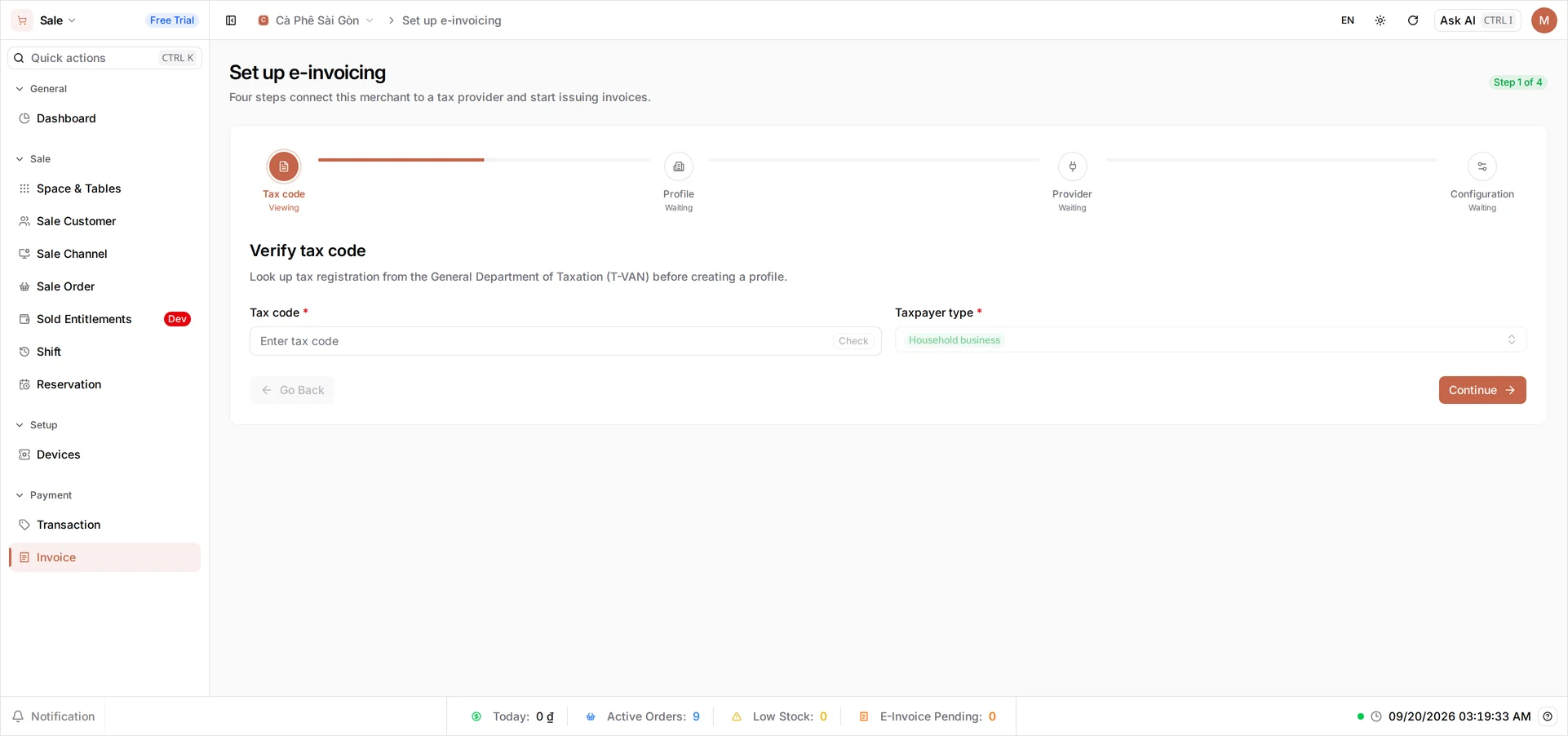
Open Sale → Payment → Invoice. If your store hasn’t connected e-invoicing yet, BANA takes you straight to a four-step setup wizard - each step must be valid before you can move to the next. Step 1, Verify tax code, looks up your registration from the General Department of Taxation (T-VAN): enter your Tax code and pick your Taxpayer type, then Continue.
- Tax code - your tax registration, verified live against T-VAN.
- Profile - set your store’s invoicing details.
- Provider - BANA currently supports VNPAY only, already selected; enter the Username and Password VNPAY gave you.
- Config - finish the remaining settings and save.
VNPAY sends invoices on to the tax authority on your behalf, over T-VAN.
Issue an invoice
Add the buyer’s details
When a customer asks for a VAT invoice, open the Invoice screen - it lists the orders you can invoice. On the order’s row, select the Buyer action, enter the buyer’s Name (Công ty TNHH ABC) and Tax code; once you enter a tax code, Address becomes required. Save.
Select the order and issue
Check that order’s box (you can check several at once), then select Issue. Confirm in the dialog - the 10% VAT is already calculated on the invoice.
BANA sends the invoice through VNPAY and records it against the order.
Manage invoices
Find and re-send an invoice
On the Invoice screen, select the eye icon on an issued row to open the invoice - view its status, download the PDF, or re-send it to the customer.
Tip: Issue invoices promptly after the sale. Keeping invoicing close to the transaction makes month-end reconciliation far simpler.
What’s next
Frequently asked questions
Do I have to issue an invoice for every sale?
No. A standard receipt covers everyday walk-in sales. You issue a VAT e-invoice when a customer - usually a business - asks for one.
What do I need before I can issue invoices?
A connected e-invoice provider and correct business details - your name, address, and tax code print on every invoice, so set them first.
What if I make a mistake on an invoice?
Issued invoices can't be silently edited - they're sent to the tax authority. You adjust or replace them following your provider's process, which BANA records against the original.