Manage your products
Pause a product you're out of and retire one you've stopped selling, so your product list and the POS always match what you actually sell.
On this page
Your product list shifts with the seasons and with what actually sells. From the Products list where you built it, you can pause an item you’re temporarily out of and retire one you’ve dropped for good - and the POS updates to match, with no deleting and no lost history. This guide pauses a seasonal drink and retires a slow seller for Cà Phê Sài Gòn.
Before you start
- You’re signed in to the dashboard at client.bana.com.vn as the owner.
- You already have products - if not, start with Add your first product, then Complete your product list for the rest of the café menu this guide works from.
Manage what you sell
Open the product list
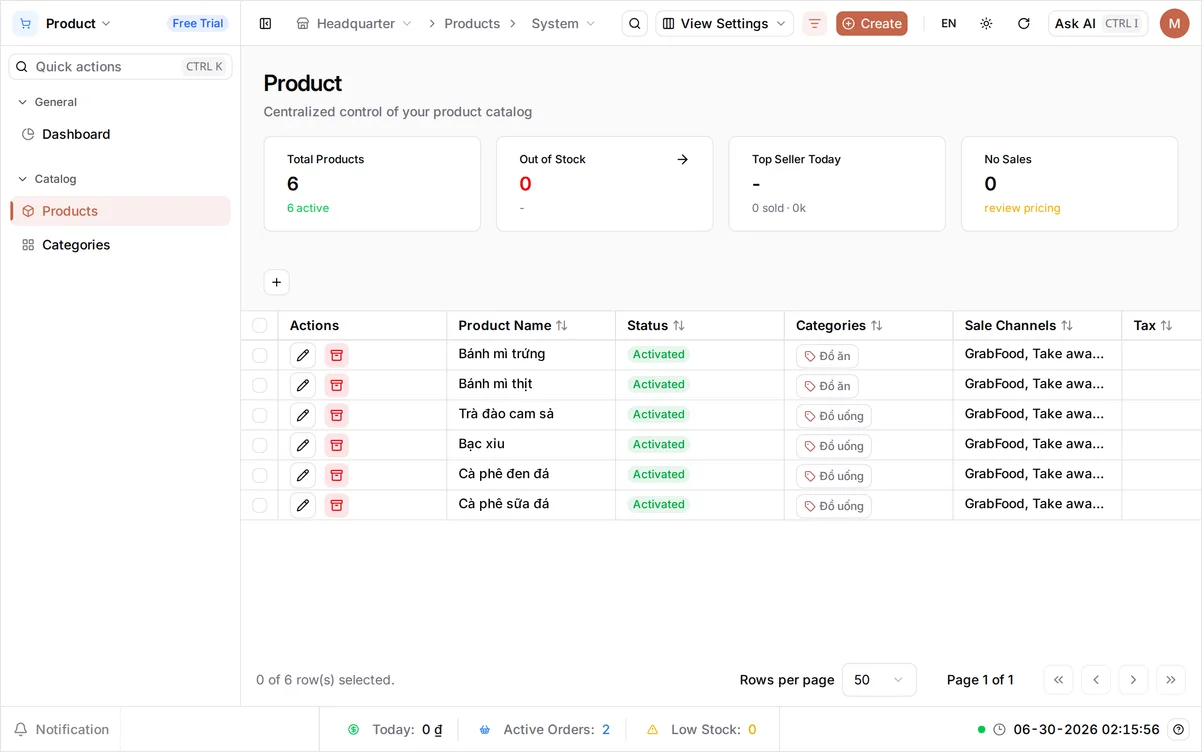
Open Products under Catalog. Actions is the first column on the left - a pencil to edit the product and an archive button beside it. The columns to its right show Product Name, Status, Categories, Sale Channels, Tax, Variant Count, Unfinished Sale Order Count and Price Range.
Status is the field this whole article turns on. It has four values, and the dropdown explains each one as you pick it:
| Status | What it means |
|---|---|
| Draft | The product record is incomplete, so it is not on sale |
| Activated | Ready to sell |
| Deactivated | Paused for now, and you can switch it back on |
| Archive | Retired from the moment you archive it |
On a phone: the Products list keeps its nine-column layout on small screens, so you will be scrolling sideways to read Status. Pausing and retiring are quick jobs - do them on a computer when you can.
Unfinished Sale Order Count is worth a look before you retire anything: it counts the orders still open that include this product. Completed orders are never affected by anything in this guide - but if that number is not zero, someone is mid-ticket with the item right now, so it is usually worth waiting until it clears.
Pause a product you’re out of
When a drink goes off-season or you run out of an ingredient, pause it instead of deleting it. Select the edit (pencil) on Trà đào cam sả and set Status to Deactivated. It stops appearing at the POS but keeps its history, ready to switch back to Activated when peaches are in season again. Select Save.
Retire a product you’ve stopped selling
For an item you have stopped selling, use the archive action on its row - here, Bạc xỉu - and confirm in the Archive dialog, which asks Are you sure you want to archive this item? It leaves your live product list but stays in past orders and reports, so your records remain complete. (Archive is also one of the four Status values on the edit form, so you can retire a product from either place.)
Tip: Reach for Deactivated when an item is coming back - it stays in the list, one edit from being on sale again. Archive is for clearing things you have genuinely stopped selling out of your way. Archiving looks final, but it can be undone - see below.
Bring back an archived product
Archiving takes the product out of the Products list entirely, which is what makes it feel permanent. It is not. Select View Archived in the top right and the list switches to everything you have filed away, each row offering a restore action in place of the usual edit and archive buttons.
Restore Bạc xỉu and BANA asks Are you sure you want to activate this item? The wording is literal: the product comes back Activated and on sale, whatever its status was before you archived it. Select Exit Archived View to return to the live list.
Verify in the product list
Back on the Products list, Trà đào cam sả now reads Deactivated and Bạc xỉu has dropped off your live product list. What’s on the POS matches exactly what you sell today.
What you changed
| Product | Change |
|---|---|
| Trà đào cam sả | Status Activated → Deactivated (paused) |
| Bạc xỉu | Archived (retired) |
What’s next
- See your current product list in action - make a sale on the POS.
- Make categories easier to spot at the till with category icons.
You’re all set - your product list stays current, and nothing you’ve sold is ever lost.
Frequently asked questions
What's the difference between deactivating and archiving a product?
Deactivating pauses a product - it stays in your product list, just switched off, so it is right for seasonal or out-of-stock items. Archiving files it away: the row leaves the list entirely and only reappears under View Archived. Both keep past orders and reports intact, and both can be undone.
Can I bring back a product I archived?
Yes. Select View Archived in the top right of the Products list, find the product, and use the restore action on its row - BANA asks "Are you sure you want to activate this item?" and puts it back on sale. Select Exit Archived View to return to your live product list.
What is the Draft status?
Draft marks a product whose record is incomplete, so it is not on sale. Open it, fill in whatever the form is still missing, and set Status to Activated to put it on sale.
Will pausing or retiring a product change past orders?
No. Both keep the product's history intact - past orders and reports are untouched. They only change whether the item is offered at the POS from now on.