Complete your product list
Add the rest of your product list the same way you added your first product, filing each drink under two categories so the till and your reports both read well.
On this page
You’ve created your categories and your first two products. This guide adds the remaining thirty-two. Two decisions repeat: which categories a product carries, and whether BANA counts its stock.
Before you start
- Your eight categories from Organize by category - Đồ uống (drinks), Đồ ăn (food) and the six drink groups.
- Your first two products, from Add your first product and Set up options and variants.
- Your price list and a photo for each item.
Add your drinks
Every variant BANA saves is Storable: it tracks stock, starting at zero. The POS won’t sell what it believes it has none of, so each product needs one of two things.
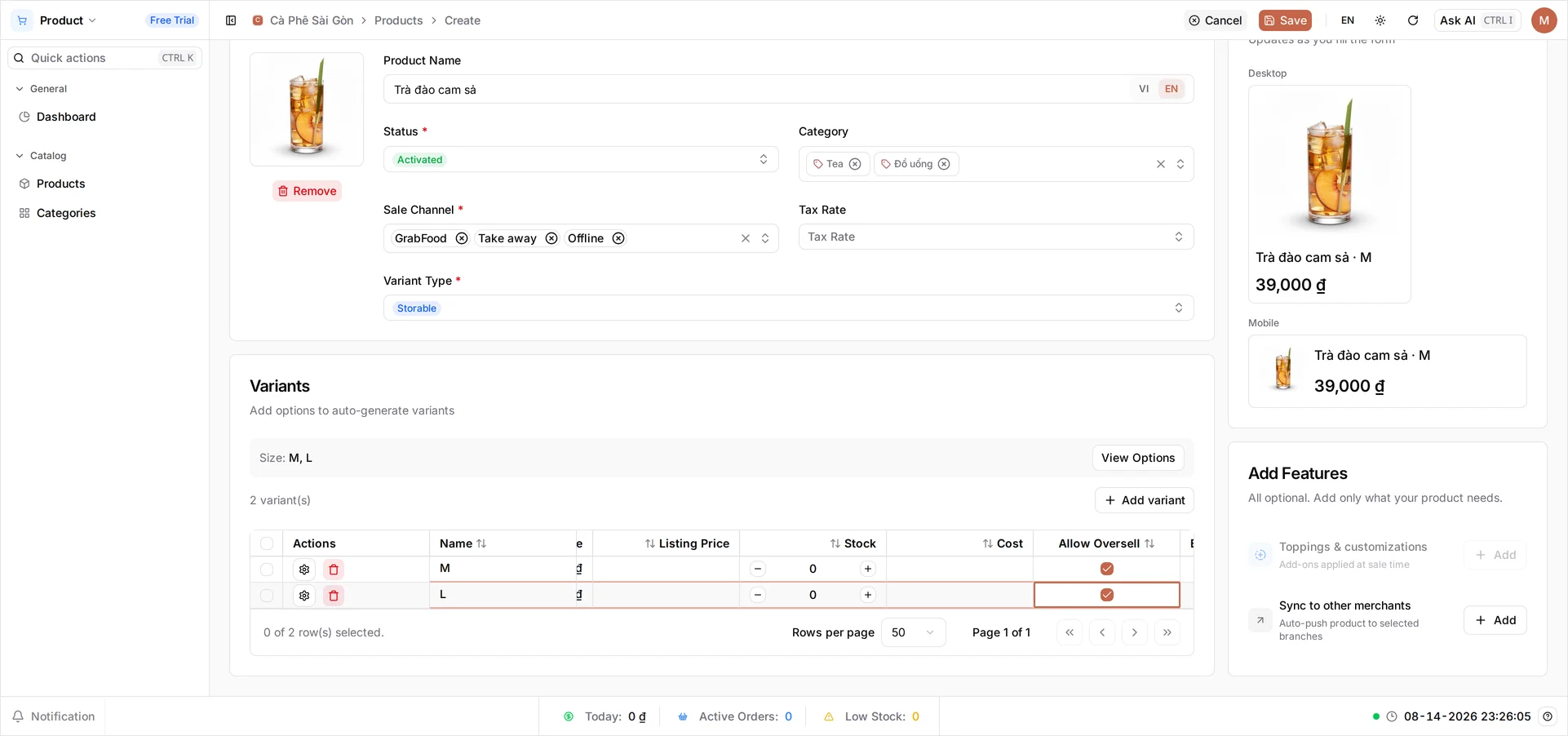
Anything you make on the spot never runs out - tick Allow Oversell. Anything you hand over as a package can - type a Stock figure. Both are columns in the variant grid, right of Selling Price, set per row. A row with neither saves happily, then gets refused at the till.
Warning: Stock, Cost and Allow Oversell are editable only while a row is new - after saving they move to Inventory → Stock. Selling Price stays editable at any time.
On a phone: the variant grid crops to its Actions column, leaving no room for Selling Price, Stock or Allow Oversell. Build your list on a computer.
Add a drink with sizes
Open Products under Catalog and select Create. Build Trà đào cam sả like the coffee - photo, name, Sale Channel - then in Variants select View Options → Add option, name it Size (the VI side is the required one), and Add the values M and L. Select Generate 2 Variants, confirm with Apply changes, price the two rows 39000 and 45000, then scroll the grid sideways and tick Allow Oversell on both. Select Save.
File every drink under two categories
Category holds more than one at a time, and every drink takes two: Đồ uống, which all of them share, plus its group. Trà đào cam sả is a tea, so it takes Đồ uống and Tea.
That lets one product list answer two questions: a report split by Đồ uống covers every drink, while your cashier gets a Tea tab holding only teas. Under its group alone a drink drops out of the drinks total; under Đồ uống alone the tab sits empty.
The packaged items are the exception - Nước suối 500ml and Cà phê hạt rang xay 250g are stock you hand over, not drinks you pour, so they take Đồ uống alone. Food takes Đồ ăn on its own.
Add a product you count as stock
Nước suối 500ml comes in one size, so you add no options. BANA still gives every product one variant row, named Default - that’s the row you price. Create it under Đồ uống, put 10000 in its Selling Price, then scroll right and, instead of ticking Allow Oversell, type your bottle count into Stock. The café counted 24.
That is only your opening count - stock moves on its own afterwards, and you can correct it under Inventory → Stock. Select Save, then add Cà phê hạt rang xay 250g at 120000, stock 12.
Fill out the product list
Here is the whole list. Every drink carries Đồ uống as well as the category shown; the two packaged items and the food carry only what is listed. The four sized drinks are built like Trà đào cam sả, adding S where there are three; everything else has no options.
| Product | Category | Price (VND) |
|---|---|---|
| Cà phê Latte | Cà phê | 39,000 / 45,000 / 49,000 (S/M/L) |
| Cà phê sữa | Cà phê | 25,000 / 29,000 / 39,000 (S/M/L) |
| Trà đào cam sả | Tea | 39,000 / 45,000 (M/L) |
| Cà phê sữa đá | Cà phê | 29,000 / 35,000 / 39,000 (S/M/L) |
| Cà phê đen đá | Cà phê | 25,000 / 29,000 / 33,000 (S/M/L) |
| Bạc xỉu | Cà phê | 35,000 / 39,000 / 45,000 (S/M/L) |
| Trà sữa trân châu | Tea | 39,000 / 45,000 (M/L) |
| Nước suối 500ml | Đồ uống | 10,000 |
| Cà phê hạt rang xay 250g | Đồ uống | 120,000 |
| Bánh mì thịt | Đồ ăn | 25,000 |
| Bánh mì trứng | Đồ ăn | 20,000 |
| Xôi gà | Đồ ăn | 35,000 |
| Croissant bơ | Đồ ăn | 30,000 |
| Cà phê sữa dừa | Cà phê | 45,000 |
| Cà phê kem muối | Cà phê | 55,000 |
| Cà phê sữa caramel | Cà phê | 55,000 |
| Coldbrew nguyên bản | Coldbrew | 45,000 |
| Coldbrew thơm | Coldbrew | 45,000 |
| Coldbrew cam | Coldbrew | 45,000 |
| Coldbrew atiso | Coldbrew | 45,000 |
| Coldbrew muối | Coldbrew | 45,000 |
| Matcha latte | Matcha | 55,000 |
| Matcha oatmilk | Matcha | 55,000 |
| Matcha kem muối | Matcha | 55,000 |
| Trà thơm | Tea | 40,000 |
| Trà cam hương thảo | Tea | 40,000 |
| Trà atiso đỏ | Tea | 40,000 |
| Trà sữa sương sáo | Tea | 40,000 |
| Trà thảo mộc nóng | Tea | 40,000 |
| Cam ép | Juice | 40,000 |
| Kombucha nguyên bản | Kombucha | 40,000 |
| Kombucha thơm | Kombucha | 40,000 |
| Kombucha cam | Kombucha | 40,000 |
| Kombucha atiso | Kombucha | 40,000 |
Food carries Đồ ăn alone. Croissant bơ is the exception: it arrives from the bakery by the tray, so it can run out and takes a Stock figure where the other three are ticked.
What you created
Thirty-four products, the two you started with included. Three are counted - Nước suối 500ml, Cà phê hạt rang xay 250g and Croissant bơ - and every other row is ticked Allow Oversell.
Verify your full product list
Open Catalog → Products. Total Products reads 34, every row is Activated, and Categories carries two entries on each drink you pour.
Out of Stock reads 0, which is the result you want: your made-to-order items sit at zero stock, but Allow Oversell means none counts as unsellable. Any number above 0 is a row that missed its tick. A product missing from the till entirely is a status problem - the product and each variant row must read Activated.
What’s next
Your product list is done; the counter is next.
- Connect printers and devices - link the POS to your store
- Make your first sale
- Create a combo
Frequently asked questions
Do I have to add every product before I open?
No, but the more complete your product list is, the less typing your cashier does at the counter. Add your best-sellers first, then fill in the rest whenever you have a quiet moment.
What is the difference between a made-to-order item and one I count?
It is about how the item reaches the customer, not what it is. Anything you make on the spot - a coffee, a bánh mì - never runs out, so you switch on Allow Oversell. Anything you hand over as a package you bought or received - bottled water, a bag of beans, a croissant from the bakery - can run out, so you give it a Stock figure.
Why does a drink need two categories?
So one product list answers two questions. Đồ uống is what a revenue report splits by, and it has to cover every drink you sell. The group - Cà phê, Tea, Coldbrew and the rest - is what your cashier taps at the till, and it has to stay small enough to scan. A drink filed under only one of them drops out of whatever the other was for.
Can I duplicate a product instead of filling the form each time?
Create each product fresh for now. Photos, names, categories and status stay editable afterwards, but Selling Price, Stock, Cost and Allow Oversell do not - so fill those in as you go rather than planning to adjust them later.
Why would nothing sell if I skip both Allow Oversell and Stock?
Every variant is saved as Storable, which means BANA tracks its stock and starts it at zero. The POS refuses to sell an item it believes it has none of. Allow Oversell turns that check off; a Stock figure satisfies it.